You're on a network that only lets web traffic out. The hotel Wi-Fi, the conference guest network, the corporate proxy, a locked-down country — they allow ports 80 and 443 for browsing and block nearly everything else. Your SSH connection hangs. Your VPN won't connect. But the web still works, because a firewall that blocked HTTPS would break the whole internet.
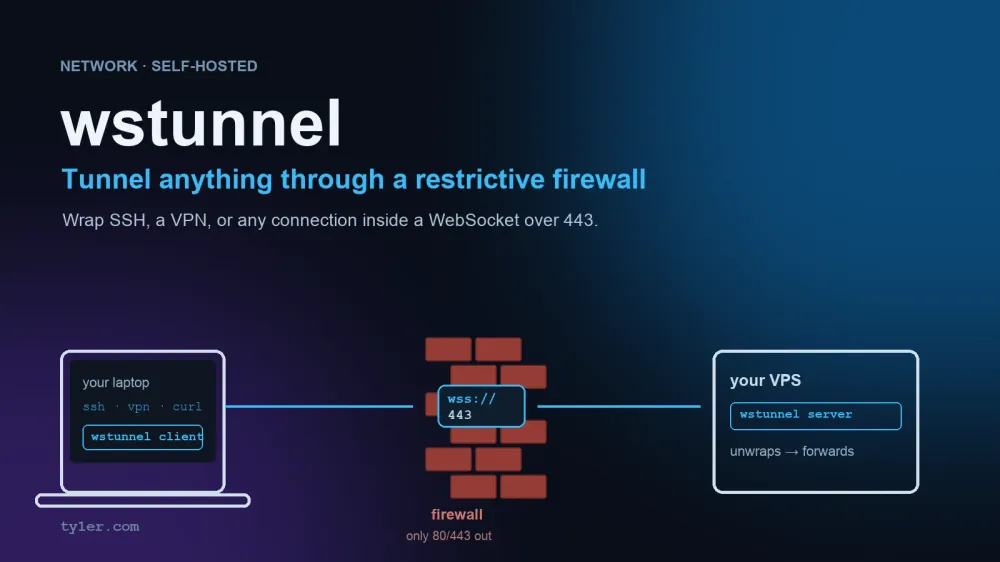
wstunnel uses that gap. It wraps any traffic — SSH, a VPN, a database connection — inside a WebSocket, the same protocol that powers live chat and notifications on ordinary websites. To the firewall it looks like a normal, encrypted visit to a web server. On the far side, wstunnel unwraps it and sends it on. It's the tool for getting out of a restrictive network, the mirror image of localtunnel, which brings the public in to your laptop.
This guide covers how it works, the commands for the common cases, and how to lock it down so it isn't an open door. Every terminal result shown was captured from wstunnel 10.7.1 running a real loopback tunnel on a Mac.
How it slips through
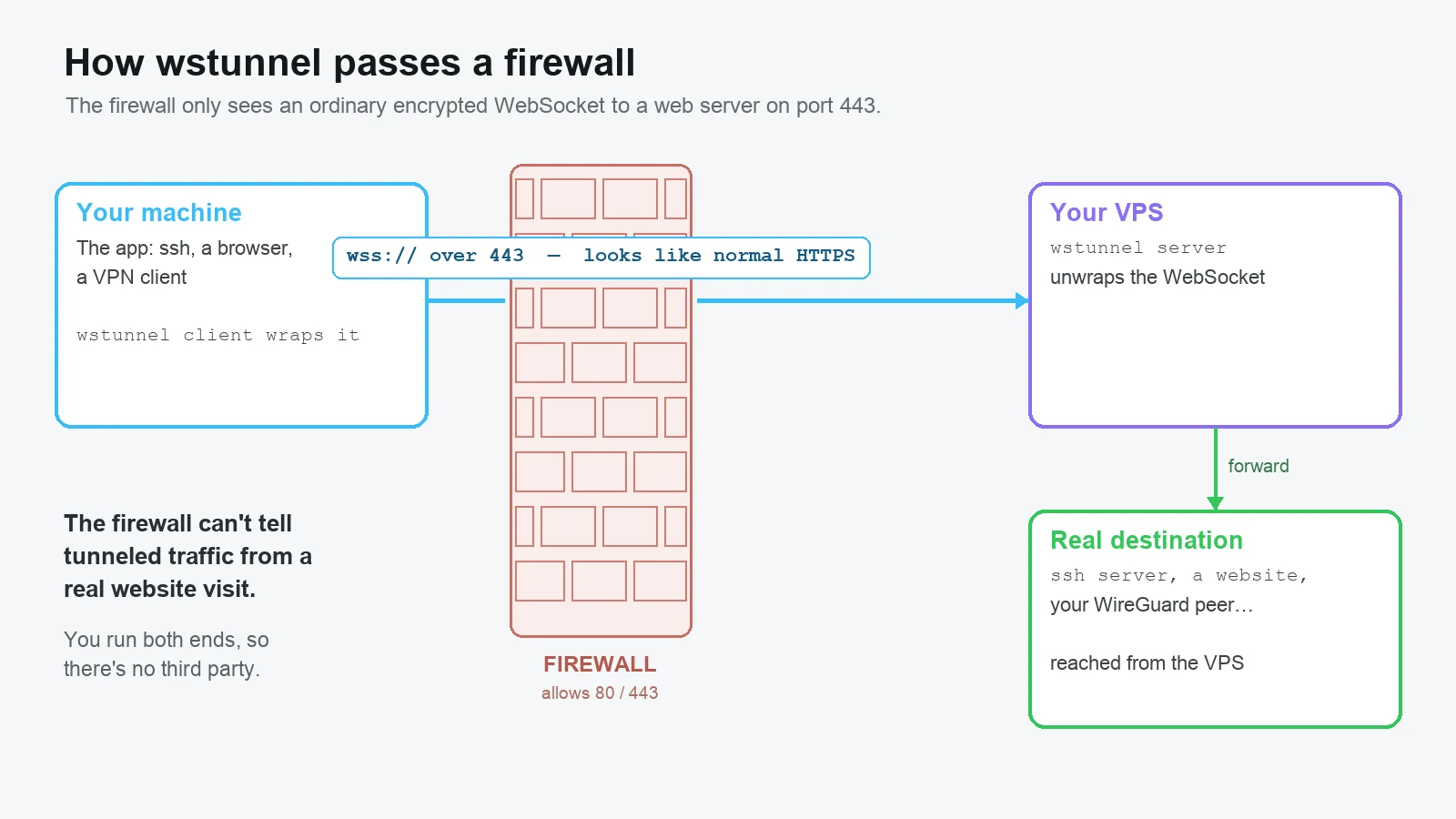
- The wstunnel client runs on your machine. It opens a local port that behaves like the service you want to reach, and forwards anything sent to it into a WebSocket aimed at your server.
- The firewall sees an outbound HTTPS connection to a web server on port 443. That's the one thing it's guaranteed to allow, so it passes.
- The wstunnel server runs on a machine you control, usually a cheap VPS. It unwraps the WebSocket and forwards the traffic to its real destination.
You supply your own server, so wstunnel is a tool, not a service. It's written in Rust, ships as a single static binary, and there's no account and nothing to sign up for.
Install it on both ends
You need the same binary on your laptop and on the server. On a Mac:
brew install wstunnel
wstunnel --version
On a Linux server, download the static binary from the project's releases page, or use the Docker image:
# static binary (replace the version/arch to match the latest release)
curl -fsSL -o wstunnel.tar.gz https://github.com/erebe/wstunnel/releases/latest/download/wstunnel_linux_amd64.tar.gz
tar xf wstunnel.tar.gz && sudo mv wstunnel /usr/local/bin/

# or Docker
docker run -d --name wstunnel -p 443:8080 ghcr.io/erebe/wstunnel:latest \
  server ws://0.0.0.0:8080
Step 1: Start the server on your VPS
The simplest possible server listens for WebSocket connections. Run it behind Nginx or Caddy on 443 with a real certificate, so it's indistinguishable from any other HTTPS site, or let wstunnel terminate TLS itself:
# plain ws, meant to sit behind a reverse proxy that adds HTTPS
wstunnel server ws://0.0.0.0:8080

# or let wstunnel handle TLS directly on 443
wstunnel server wss://0.0.0.0:443 \
  --tls-certificate /etc/letsencrypt/live/tunnel.example.com/fullchain.pem \
  --tls-private-key  /etc/letsencrypt/live/tunnel.example.com/privkey.pem
Don't run it wide open. A default server will forward to anywhere, which turns your VPS into an open relay. The Locking it down section below fixes that, and you should apply it before the server faces the internet.
Step 2: Connect from your laptop
The client opens a local entry point and forwards it through the server. The most useful shape is a SOCKS5 proxy, because a single one carries traffic for anything that speaks SOCKS — your browser, your SSH client, most command-line tools:
wstunnel client -L socks5://127.0.0.1:1080 wss://tunnel.example.com:443Now point a tool at 127.0.0.1:1080. For example, fetch a page as if you were the VPS:
curl -x socks5h://127.0.0.1:1080 https://ifconfig.me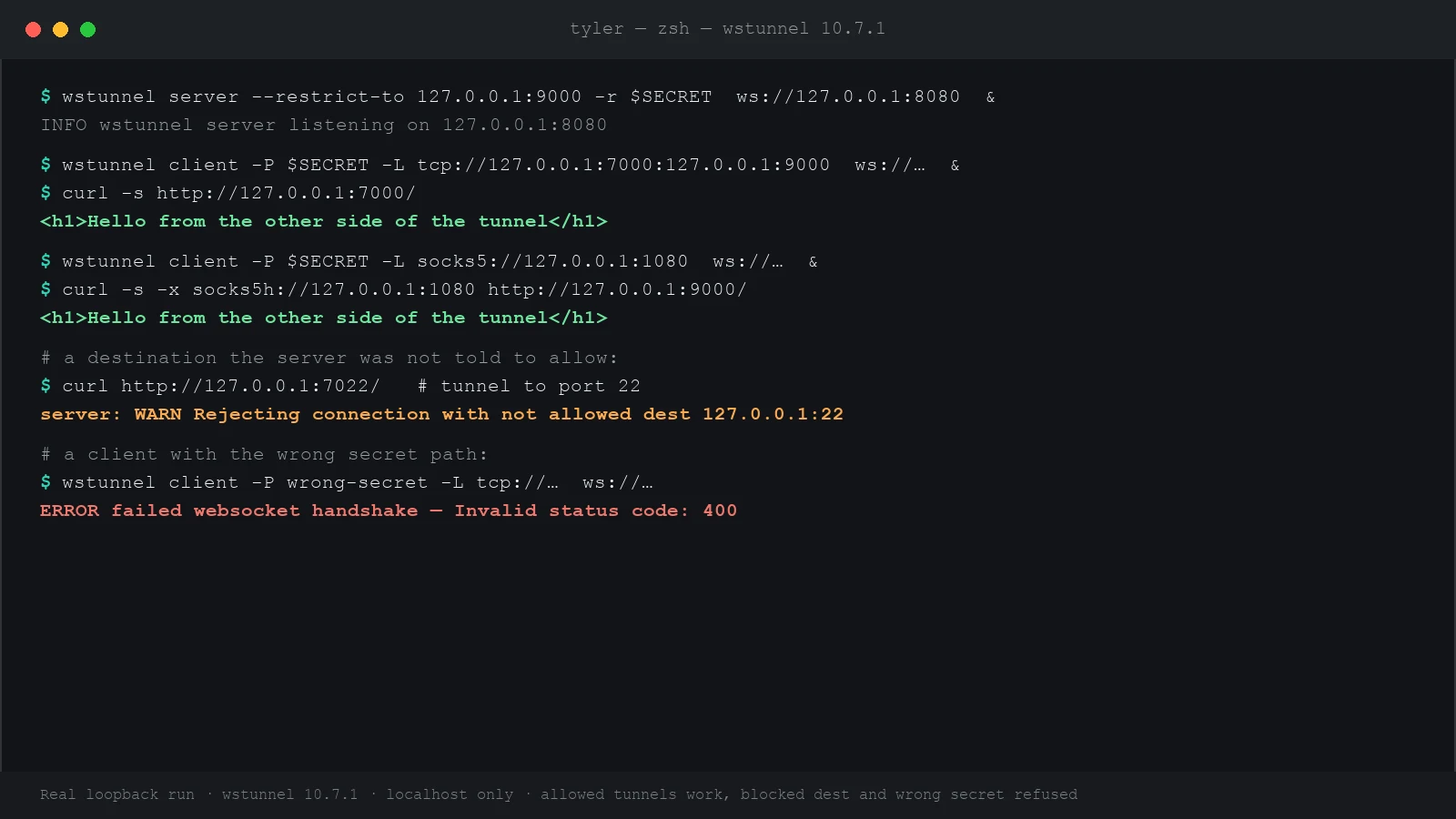
That output is a real wstunnel 10.7.1 run. Both the TCP tunnel and the SOCKS5 proxy returned the test page. The two connections the server should refuse — a destination it wasn't allowed to reach, and a client with the wrong secret — were both rejected, which is the behavior the next section sets up.
The recipes you'll actually use
All of these assume a running server at wss://tunnel.example.com:443.
SSH out of a network that blocks it
Wrap SSH in the tunnel with a ProxyCommand, so ssh myserver just works even where port 22 is blocked. The stdio:// forwarder is built for exactly this:
ssh -o ProxyCommand='wstunnel client -L stdio://%h:%p wss://tunnel.example.com:443' user@myserverRoute your browser through the VPS
Start the SOCKS5 client above, then set your browser or system proxy to SOCKS5 host 127.0.0.1, port 1080. Every request now exits from the VPS. Prefer SOCKS5h (the h means the proxy resolves DNS) so lookups don't leak onto the local network.
A full VPN (WireGuard) over the tunnel
On a network that blocks the UDP that WireGuard needs, wstunnel can carry it. Point a UDP tunnel at your WireGuard server's port, then aim the WireGuard config at the local side:
wstunnel client -L 'udp://51820:127.0.0.1:51820?timeout_sec=0' wss://tunnel.example.com:443
# then set the WireGuard peer Endpoint to 127.0.0.1:51820
Reach back to a machine behind the firewall (reverse tunnel)
-R reverses the direction: the server opens the listening port, and connections are forwarded back to the client's side. Useful for reaching a machine that can make outbound connections but can't accept them:
wstunnel client -R 'tcp://[::]:8000:localhost:8000' wss://tunnel.example.com:443Forwarder types at a glance
| Prefix | What it does |
|---|---|
socks5:// | A SOCKS5 proxy — the most flexible; one tunnel for many apps |
tcp:// | Forward one TCP port to one destination |
udp:// | Forward UDP — needed for WireGuard, DNS, game traffic |
stdio:// | Bridge standard input/output — the SSH ProxyCommand case |
http:// | An HTTP proxy, as an alternative to SOCKS5 |
unix:// | Forward a Unix domain socket |
Swap -L for -R on any of these to reverse the direction.
Locking it down (do this before it faces the internet)
An open wstunnel server will forward traffic to any destination for anyone who finds it. Two flags close that off, and they're not optional for a public server.
Restrict where it can forward
Limit the server to the exact destinations you need. A connection to anything else is refused:
# only allow forwarding to the local SSH port
wstunnel server --restrict-to 127.0.0.1:22 wss://0.0.0.0:443
In the run above, a client that asked for port 22 when the server only allowed the web port was rejected with "Rejecting connection with not allowed dest" — that's this flag doing its job.
Require a secret path, so scanners see nothing
wstunnel can require every client to know a secret path prefix. Without it, the server answers with a normal-looking HTTP error, so an internet scanner can't even tell wstunnel is there. Generate a long random value and share it between the two ends:
SECRET=$(openssl rand -hex 16)

# server
wstunnel server --restrict-http-upgrade-path-prefix "$SECRET" wss://0.0.0.0:443

# client
wstunnel client -P "$SECRET" -L socks5://127.0.0.1:1080 wss://tunnel.example.com:443
In the test run, a client with the wrong secret failed the WebSocket handshake and never opened a tunnel. Combine both flags, put the server behind a real HTTPS certificate on 443, and it's very hard to distinguish from an ordinary website.
A note on responsible use
wstunnel is a legitimate network tool — reaching your own servers from a hotel network, testing from behind a corporate proxy, keeping a connection alive on flaky Wi-Fi. It can also cross network policies and, in some places, laws. Only use it on networks and against destinations you're authorized to, know your employer's acceptable-use policy before tunneling past a corporate firewall, and understand the local rules if you're using it to bypass national censorship. The tool doesn't make those judgments for you.
Troubleshooting
| Symptom | Likely cause and fix |
|---|---|
| Client can't reach the server at all | The network may block even 443 to unknown hosts, or your server isn't listening. Confirm the server is up and that plain HTTPS to it works from the same network. |
| Handshake fails with a 400 or 404 | Path-prefix mismatch. The -P value on the client must exactly match --restrict-http-upgrade-path-prefix on the server. |
| "Rejecting connection with not allowed dest" | The destination isn't in the server's --restrict-to list. Add it, or point at an allowed one. |
| Works, but DNS leaks to the local network | Use socks5h:// (with the h) in clients so the proxy resolves names, not your machine. |
| Connection drops on idle | Add --websocket-ping-frequency 30s so a keep-alive ping holds the connection through NAT and proxy timeouts. |
| UDP tunnel closes immediately | UDP has no connection to track; set a timeout in the forwarder, e.g. udp://…?timeout_sec=0 to keep it open. |
The short version
- wstunnel wraps traffic in a WebSocket so it passes a firewall that only allows web traffic.
- You run both ends: a server on your VPS, a client on your machine. Same binary.
- A SOCKS5 client is the most useful shape — one tunnel for the browser, SSH, and CLI tools.
- Lock the server down with
--restrict-toand a secret path before it faces the internet. - Put it behind real HTTPS on 443 and it looks like an ordinary website.
To go the other direction — a public URL for something on your laptop — see localtunnel. For the SSH basics underneath all of this, see the SSH cheatsheet.
Sources
- wstunnel on GitHub (erebe/wstunnel) — README, full flag reference, and releases
- wstunnel releases — static binaries for every platform
wstunnel server --helpandwstunnel client --help— the authority for your installed version (10.7.1 here)